Results
See all the blog posts about our distant reading of Hemingway.
Rationale
As we’ve explored in a number of assignments throughout the semester, you can get a different sense of texts if you do pattern recognition at a slightly different angle. So far this has meant that we’ve considered a novel via its geography, a poetry collection at the macro level, and films that we summed. But in each case, we did the “normal” humanities thing by reading or watching the text and discussing it. Only then did we look at it through a computational lens.
But what if we decided to try pattern recognition and interpretation on something so large that a class could never read it in a single semester, let alone the last two weeks? Consider this one last crazy digital humanities experiment!
Part of this experiment will involve us confronting, once again, the friction of formats. Computational approaches require computable information, and it turns out that print books aren’t. Or at least, they aren’t yet. This project brings us yet another way to think about getting material from one format into another.
The Nitty Gritty
Collectively, we will finish building a dataset of all of Hemingway’s stories, novels, and nonfiction. (Say, “Thanks!” to my previous classes for getting us started.) Individually, you will be scanning a number of pages from one or two of his books and then processing those scans with optical character recognition (OCR) software.
Scanning
It turns out that books can be kind of hard to scan since there’s all that pesky page-turning to deal with. We’re going to simplify things by making these books less book-like and removing their bindings.
- You will scan the pages that you are assigned, turning the pages into PDFs. If you have selections from multiple books, please scan those pages in two chunks, creating two different files.
- There are three printers around the JKB that have automatic feeders and that can scan both sides of the page. You can find them in 3003C, 4073 East, and 4016 West. I estimate that it will take you 5 minutes to do the scanning. The scanners will email you the file.
- Before scanning, you need to make four changes to the default settings:
- The default is to only scan one side of the page. You need to make sure you scan 2 sides.
- Set scanner to work in grayscale rather than color.
- The default on the scanners is 300 dpi, but you should set it to 200 dpi, as it will result in a smaller file.
- The default file type on the scanners is a Compact PDF. This will produce poor output. Instead, you need to change the file type to PDF.
- When you have received the file, check it to make sure you got both sides of the page. Then rename it to lastname-bookabbreviation-pages; for example, croxall-FWBT-75-254.pdf. If you’re working with two different books, please break this into two different files. Upload a copy of the PDF(s) to this Google Drive folder.
OCR
- To do the OCR work, you will need to bring your PDFs to one of several computers in the JFSB that have Prizmo installed on them.
- All of the Macs in B181 JFSB should have Prizmo installed. Classes meet in this room, but I’ve reserved it at the following times:
- Monday, 4 December from 1:30-4:00 pm
- Tuesday, 5 December from 3:00-4:00 pm
- Wednesday, 6 December from 1:30-4:00 pm
- Thursday, 7 December from 3:00-4:00 pm
- Saturday, 9 December from 12:00-5:00pm
- All of the Macs in the two labs on the main floor of the JFSB (1133 and 1141) have Prizmo installed. These labs are open Monday – Saturday, from the morning until late in the evening.
- All of the Macs in B181 JFSB should have Prizmo installed. Classes meet in this room, but I’ve reserved it at the following times:
- When opening Prizmo, choose “New Document…” and then drag-and-drop your PDF onto the window.
- Make sure that “Abc” is selected in the upper left, and that the language is set to English. You shouldn’t have to make any other adjustments to the settings.

- Select all of the pages in your file by clicking on a single page image and choosing Edit > Select All (⌘A).
- Then click “Recognize.”
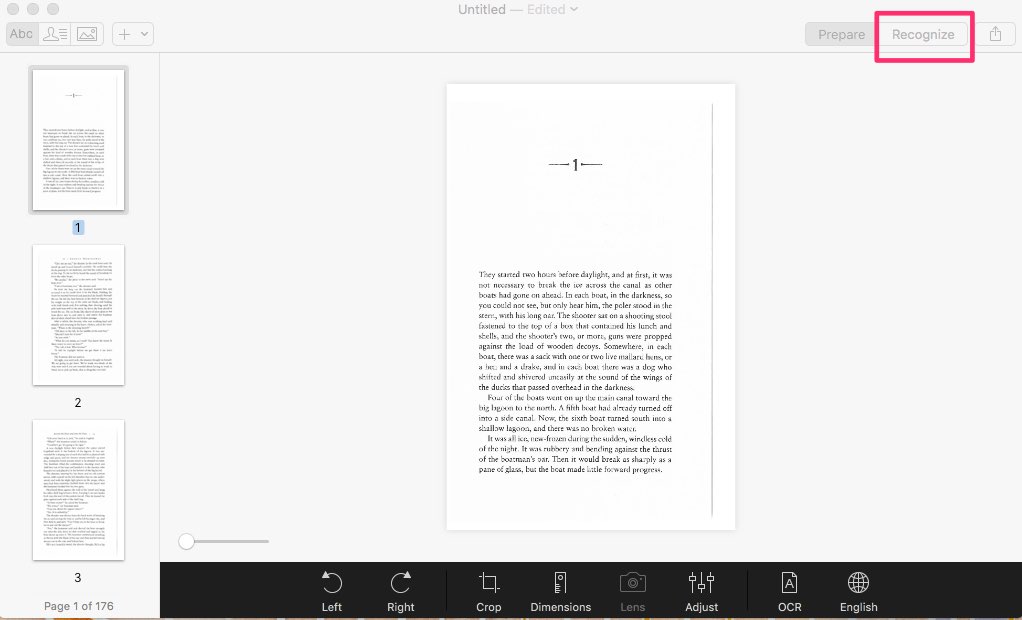
- Sit back and relax as Prizmo processes all of your text.
- As you look through each page of the text, do the following:
- First, make sure that only the body of the text is selected on the page.
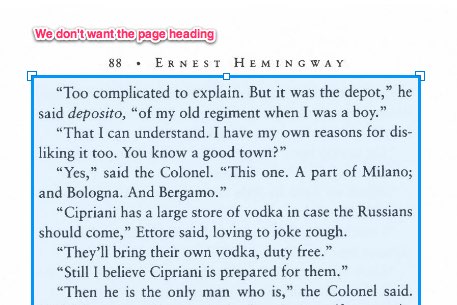
- Second, check for misspellings and correct them. They will have red underlines; if the word is spelled correctly and will repeat regularly throughout your pages (like a character’s name, a place name, or a foreign word), you can right-click and tell Prizmo to ignore that word moving forward.
- Third, check for random characters such as numbers or strange punctuation marks and correct them. Prizmo won’t catch these with red underlines most of the time. Just glance around the page. You’ll be surprised how good the human eye is at seeing misplaced characters.

- Remember: I’m not asking you to read through each and every single word.
- First, make sure that only the body of the text is selected on the page.
- When you’ve finished all of your pages, choose Export… and set the Format to “Regular Text”. Make sure you include all pages. Click “Export to File…” and then save the file.
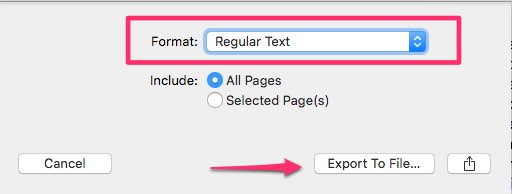
- Name your file lastname-bookabbreviation-pages; for example, croxall-SAR-100-286.txt and email me the file.
- If you have pages from more than one book, you will have to go through this process with your two different files. But don’t worry, I made the number of pages equal for everyone.
- Important: Please do not spend any more than five hours on the OCR, even if you don’t finish.
- You need to get me all of your files no later than 3 pm on Friday, 15 December. This will give me the chance to compile everything in time for the final.
Book Assignments
| Name | Book(s) | Pages |
| Anderson | AFTA | 1-202 |
| Bunker | TOS / OM | All / All |
| Burdick | SAR | 1-200 |
| Calder | GoE | 1-200 |
| Davidson | THHN | 1-200 |
| Dichmann | AtR / AFTA / SAR | 201-283 / 203-332 / 201-251 |
| Farnsworth | SS | |
| Harper | SS | |
| Kim | SS | |
| Lyman | SS | |
| Pickrell | IS | 1-200 |
| Rackleff | IS | 201-400 |
| Sampson | FWBT | |
| Thiriot | FWBT | |
| Vite | FWBT | |
| Whitaker | AtR | 1-200 |
| Croxall | Odds and Ends |
Book Abbreviations
- AFTA = A Farewell to Arms
- AtR = Across the River and Into the Trees
- GoE = Garden of Eden
- FWBT = For Whom the Bell Tolls
- IS = Islands in the Stream
- OM = Old Man and the Sea
- SAR = The Sun Also Rises
- SS = Complete Short Stories
- THHN = To Have and Have Not
- ToS = Torrents of Spring
Final
- For the final exam, we will again use our old friend Voyant to find patterns in the Hemingway data set. You will work in groups again and have free range of the tools. Since we won’t have read everything, you’ll have a much different opportunity to draw conclusions than with Duffy’s poetry. Who knows, maybe even the word collocates will be interesting this time!
- In your groups, you will write a 800-word (minimum) blog post about the patterns that you’ve found and the interpretations that you derived from them. Finally, your group will also give a brief presentation on the work that you’ve done.
- Then we’ll all high-five each other and ride off into the sunset.
Group 1
Sadie
Maddie
Mike
Paul
Tara
Group 2
Amanda
Kelly
Alex
Liz
Stephen
Group 3
Elizabeth
Shelbi
Clarissa
Miles
Chris
Grading
This project, including the final, is worth 10% of your grade in the class. As an experimental class project, you are not being graded on what you and your group find about Hemingway’s work. After all, we simply don’t know what we’ll find—if anything.
Instead, you’ll be graded on (1) whether you accomplish all the parts of the assignment (pass/fail); (2) how engaged you are with the work; and (3) how well you apply the method of screwing around / pattern recognition/interpretation we’ve been embracing throughout the semester.
Credits
This assignment was designed by Brian Croxall and is licensed with a Creative Commons BY (CC BY 4.0) license. Special props to Stewart Varner for telling me to stop thinking about Whitman; David Mimno and Ted Underwood for encouragement; and Paul Fyfe and Jason B. Jones for an idea that I gleefully ripped off.
