Summed Films
Here’s an archive of all eight group’s summed films.
Rationale
If Stephen Ramsay argues for the importance of building things in the digital humanities, Mark Sample proposes something else entirely, “a theory and practice of a Deformed Humanities.” This version of DH privileges breaking things and exploring their insides. He claims that the process of deforming is a “legitimate mode of doing and knowing.” I suppose there’s only one way to know…
Oh, and one more thing. This assignment continues our exploration of what it takes to digitize the humanities. One of the things that’s important about the digital, when compared to the analog, is that the digital is infinitely transformable, manipulable, and copy-able. But it turns out that making something digital isn’t nearly as neat and easy as all that. What’s more, even objects that are digital resist manipulation due to file types that are incompatible with one another. In this project, we’ll find ourselves running into the friction of formats.
The Nitty Gritty
This assignment has eight (?!) parts. You will work in groups of two to complete the first seven parts. While it is possible to split these tasks up among group members, it’s critical that you work together on all of it because that’s where the learning happens! 🧙♂️ 🧙♀️
Select a Film
As a group, pick a film that you want to digitize. It should be one that you have both seen before. (I know, I know: this will in no way be as easy as it sounds.) You will need access to a DVD copy of it, either one that you own or that you can get from a library.
Rip a Film
Rip the DVD to the .m4v format using Handbrake. You can do this at the HBLL’s Media Center, which has computers with Handbrake already installed, or you can do it on your own computer. If you go to the Media Center, you should consider reserving a multimedia editing computer.
For our purposes, you should rip the DVD with the Fast 480p30 setting. It will provide good enough results for our purposes and be relatively quick. You should anticipate it taking 40 minutes or so to rip a 2-hour film.
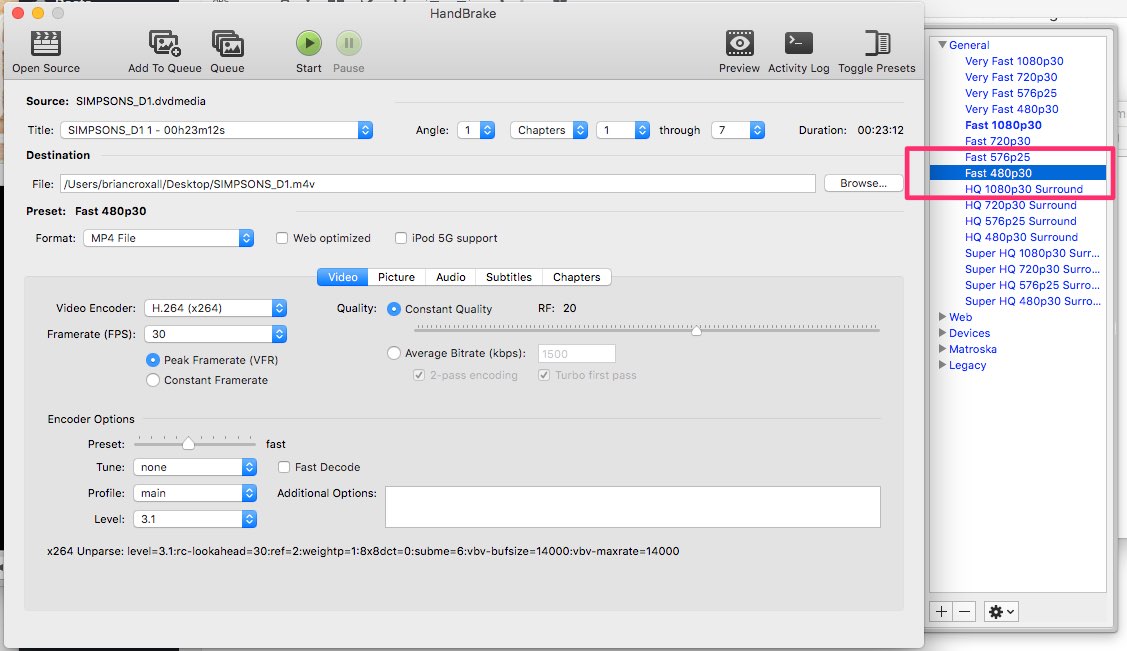
Handbrake is relatively easy to use, and LifeHacker provides step-by-step instructions. If you’re installing on a Mac that you own, however, I would recommend MacWorld’s short article. It is critical that you follow the instructions to make it possible to rip copy-protected DVDs; otherwise, you’ll get some distinctly unpleasant and unusable results. For Mac users running Sierra or High Sierra (probably all of you), this involves work on the command line. It’s not difficult, but, again, it’s necessary.
Extract a Film
Extract frames from your ripped film at the rate of one frame for every two seconds. You can do this most easily with the free VLC Media Player. Once you have downloaded VLC, you will need to make a few changes to its settings to get the images out.
- Go to preferences.
- Click “show all”
- Click on “video”
- Click on “filters”
- Find “scene video filter” and tick that box
- Scroll down under “filters” to find “scene video filter.” Select it to edit its preferences.
- Paste in a directory path for where you want the screenshots to be collected.
- Set the “recording ratio” to be how often you want a still to be grabbed. For our purposes, you should set this to “60,” which will provide one frame for every two seconds.
- Click save.
- Open a movie file in VLC and let it play.
- Watch the screenshots roll in. (Check to make sure that they’re appearing.)
For a watch-as-you-go example of these steps, watch this video by Prerit Patidar.
VLC will have to play the entire film from beginning to end in order to capture the frames. You can mute VLC and let it run in the background, however.
Sum a Film
Following the process that Kevin L. Ferguson explains at the end of his article in Hyperallergic create a summed z-projection of your frames. Since you will have already extracted all the frames of your film, you can skip step 2.
Once you have the summed image, be sure to save a copy of it.
Barcode a Film
In addition to making a summed image, you will also use ImageJ to create a “barcode” of your film, similar to what you see at the Tumblr MOVIEBARCODE.
- Open ImageJ.
- File > Import > Image Sequence…
- Point the file browser to the folder that has your frames.
- Make sure you do not choose a virtual stack. It needs to have a real “stack.”
- Let your frames load. This will take a while, and you can watch the progress bar.
- Image > Stacks > Orthogonal Views
Once you have the two barcodes, save copies of them.
Blog a Film
Prior to the presentation (see below), post both your summed image and your barcodes to a group member’s blog.
Present a Film
As a group, you will present your summed images and barcodes to the class on Thursday, 16 November. Presentations should be at least 2 minutes long, but no longer than 5 minutes. Both of you must participate in the presentation. In the presentation, you will report on patterns that your group has found and offer an interpretation of those patterns. (This is still our digital humanities class, after all.)
Reflect on a Film
Finally, each of you will individually prepare a two- to three-page paper in which you reflect on this assignment. Reflection papers must be emailed to me as PDFs before class begins on Tuesday, November 28. Please name your file “last name”-manyeyes.pdf (e.g., croxall-manyeyes.pdf).
Some questions to consider in your reflections are:
- What did I learn by completing this assignment that I couldn’t have learned by watching the film alone?
- As I completed the assignment, did I feel like I was deforming something? Or building something?
- What did I learn about digital humanities in this experience?
- What did I learn about digitizing the humanities?
- What was my experience of working in a group on this assignment?
- What would I change about this assignment to make it more relevant, informative, enjoyable, challenging, or interesting?
Extra Credit: GIF a Film
For an extra 10 points, your group can create two GIFs from your film. GIFs are easy to create, thanks to these step-by-step instructions from LifeHacker. Email the GIFs to me before class begins on Tuesday, November 28.
Groups
Clarissa
Chris
Alex
Amanda
Liz
Miles
Sadie
Shelbi
Elizabeth
Tara
Dane
Mike
Maddie
Paul
Kelly
Stephen
Grading
As an experimental class project, you are not being graded on what you and your group find about your film. Instead, you are being graded on (1) whether you successfully complete all of the different steps (pass/fail), (2) how engaged you are with the work and your group, and (3) how well you apply the method of pattern recognition / interpretation we’ve been embracing throughout the semester. And, of course, how well you’re practicing screwmeneutics.
Credits
This assignment is inspired first and foremost by the work of Kevin L. Ferguson, who has shared his methods for creating summed z-projections of films with the world and has also graciously answered a number of questions from me as I started exploring his methods. Two others who have contributed to this assignment—perhaps indirectly—include Mark Sample, who invites us to break things, and Zach Whalen, who builds remarkable things, at a rate that astonishes me, and whoever is behind the Tumblr MOVIEBARCODE. And of course, the assignment’s aggressively hopeful pun/name points back to the work of Martin Wattenberg, Fernanda Viégas, and others on IBM’s ManyEyes.
